SVOY A digital menu system for a multi-hall restaurant
A digital menu where every hall gets its own version of the menu and its own prices — all managed from a single admin panel.
Scan to open the menu
Menu
Pizza Margherita
Tomato sauce, mozzarella, basil
3,500 ₸
- Client
- SVOY, a restaurant in Astana
- What we did
- Digital menu, admin panel, QR codes for halls
- The idea
- One menu — different prices depending on the hall
Project archive
The project is no longer publicly available. This case study shows the solution architecture, the guest journey and the key features we built.
One dish, three different prices
The restaurant has several separate halls, and the same dish can cost differently in each of them. Yet it didn't need three independent menus — it needed one menu that knows which hall the guest is in.
Different prices per hall
A dish's price depends on the hall the guest is sitting in.
Nothing to choose
Guests shouldn't hunt for the right menu or pick a hall themselves. Scan — and see the right prices.
One place to manage
The administrator manages the menu centrally instead of maintaining several separate versions of a site.
A QR code for every hall
Each hall needs its own QR code that leads to its version of the menu.
Hall A
Pizza Margherita
3,500 ₸
Hall B
Pizza Margherita
4,000 ₸
Hall C
Pizza Margherita
4,500 ₸
How do you keep prices different while keeping the menu single?
One menu system. Multiple halls. Different prices.
We built a digital menu system in which the menu is tied to a specific hall. Every hall has its own entry point.
A hall's QR code carries the hall's identifier. From it, the system knows which hall this is and shows the menu with that hall's prices.
Admin panel
one place to manage
Hall A
Hall
QR code A
Hall A
Menu A
Hall A
3,500 ₸
Prices
Hall B
Hall
QR code B
Hall B
Menu B
Hall B
4,000 ₸
Prices
Hall C
Hall
QR code C
Hall C
Menu C
Hall C
4,500 ₸
Prices
One dish. The price depends on the hall.
The key decision of the project: we didn't copy the menu for each hall. A dish exists in the system once, and its price is set in the context of a hall.
So when a dish changes — its name, description or photo — it doesn't have to be edited three times. One object changes, and each hall keeps its own price.
Pizza Margherita
Tomato sauce, mozzarella, basil
name, description, photo, category
Copying the menu
- Three menus to maintain
- Every change made three times
- Versions drift apart over time
What we did
- One menu and one card per dish
- A change is made once
- Only the price differs
* Prices in the examples are illustrative
Scan to open the menu
A QR code links the physical hall to the digital menu
Every hall gets its own QR code, which the restaurant places right in that hall. The code already "knows" the hall, so the guest journey is as short as it gets.
- 1The guest sits down in a hall
- 2Sees the QR code
- 3Scans it with a phone
- 4The digital menu opens
- 5The system identifies the hall
- 6The guest sees that hall's dishes and prices
Guests don't need to understand the system. The QR code sets the hall context.
Every version of the menu, from one place
The admin panel was a separate part of the solution. Through it, the administrator manages halls, the menu, prices and QR codes — instead of running several independent menus.
- Creating and managing halls
- Managing the menu
- Hall-specific prices
- Generating QR codes
- Linking a QR code to a hall
- Updating information centrally
| Hall | QR code | Status |
|---|---|---|
| Hall A | Active | |
| Hall B | Active | |
| Hall C | Active |
* Schematic illustration of the interface, based on the features we built
A menu that opens on the guest's phone
Guests see a familiar restaurant menu: categories, filters, descriptions and prices. The prices already match the hall they're sitting in.
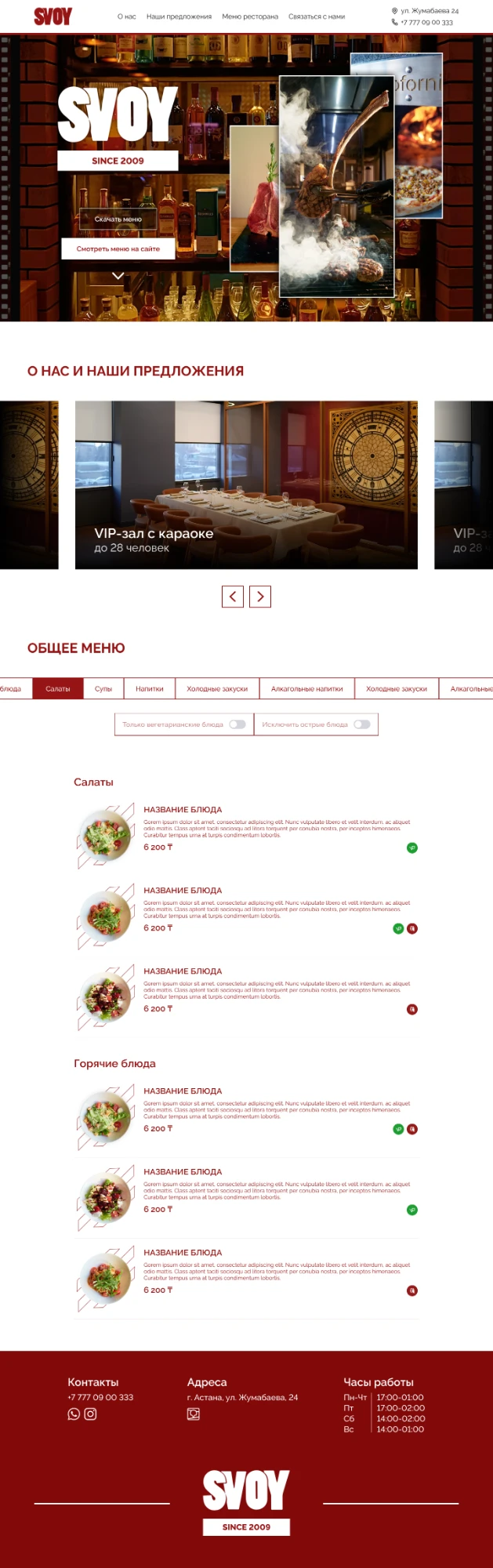
A centralized digital menu system
The restaurant got a system where every hall has its own QR code and its own set of prices.
And all management stayed in a single admin panel: halls, menu, prices and QR codes.
We didn't build three menus. We built one system that serves three halls.
This project shows how we handle non-standard requirements: first we understand the business logic, then we turn it into a system that works for both the guest and the administrator.
Discuss your project